
In the cloud you don’t need a development environment. You need two.

When I was much younger
Clients seldom agreed to the number and configuration of IT environments that constituted the perfect setup.
Some would have a dedicated unit testing environment, one for the integration test, one more for the preproduction (where the performance tests would be performed) and finally one for production.
Some would have a hot/standby production. Some would have an active-active production. Some would have a DR site in addition to the active-active production.
The only area where all my clients in the early 2000s agreed was that only one development environment was needed. Sometimes the development environment was owned, hosted and managed by the system integrator creating a custom solution rather than by the client.

The first time it came to my attention that the traditional definition of development environment was getting obsolete.
A few years ago, circa 2015-2016, I went to visit a customer in Malaysia to run a proof of concept for a data federation solution together with a few colleagues.
We took into account a number of technical and non-technical factors to select the platform we would use and finally we agreed with the customer to utilize the VMWare edition of our database that was recently made available.
We provided the installation files to the person managing the development environment of the customer and the installation scripts failed very soon, already during the environment checks, because the environment was over-provisioned. Such a check is indeed very reasonable for a production database but not so much for a PoC.
This initial failure led the customer to scrutinize the entire installation script and raise a number of concerns about how it would interact with the existing VMWare setup. The script was not just installing our software, it was also configuring the virtual hardware of the VMWare environment to ensure it matched the configuration expected by the installer.
The key feedback we received went along the lines of: “my VMWare development environment is my developers’ production environment, and I won’t allow your script to change it potentially destroying the productivity of my team”.
A member our team was very talented with VMWare and was able to edit the standard installation scripts to remove all the parts the customer considered a risk for its environment and enable the installation without a glitch while maintaining the existing infrastructure setup unchanged.
We just noted down that in the future we should ask for a dedicated infrastructure to run our VMWare edition and I put the experience in the long-term storage of my brain.

Infrastructure as code (IaC) is the new norm and this changes the management of the development environments forever.
Having a single development environment for both the software and the infrastructure IaC development creates two challenges for an organization.
On one side there is the risk of IaC developments disrupting the productivity of the other developers.
On the other side, to minimize the risks associated with the IaC changes, the organization might put in place a set of restrictive guardrails that effectively cripple its ability to innovate and bring the ways of working back to the pre-cloud era.

Just having a second, isolated, development environment for IaC is not enough.
Many infrastructure mistakes are only discovered when applications are executed.
To ensure the IaC errors are detected early, when the blast radius is minimal, the pipelines for the “normal” software components have to deploy and automatically test in the IaC development environment as well.
Any failure detected only in the IaC development environment shall then be raised to the infrastructure team while the failures happening both in IaC and SIT are raised to the component development team like before.

How do you approach the challenges and opportunities introduced by IaC?
Dell 6430u updated to bios A10

Two days ago I did a new bios update on the notebook.

The process worked fine as usual and, again as usual, did not fix or improve the issue with the fan noise.
After 36 months with it I have to bear it for only 12 more months until the notebook is due to refresh.

A positive note about the 6430U: it does no longer trigger the security scanner in the Ben Gurion airport. Whatever the chemical that was there it is now completely evaporated.

Cleaning my mother’s apartment: Techno-fossils found

10 years after I’ve left my mother’s home she decided to make some renewal.
In order to proceed it was necessary to clean some (a lot) of my stuff still there: I got a sunday call and lost my opportunity to make a nice nap.

In exchange I had the opportunity to find some vintage technology that included:
OS/2 2.0 (original)
OS/2 2.1 (original)
OS/2 3.0 (beta, original and paid for!)
OS/2 3.0 Warp (original: any doubt about the fact that I liked OS/2?)
AT&T Unix system V 3.2 (original, a bunch of 5¼” floppy disks)
Borland Paradox 4.5 (original)
Populous (original, the first one, 5¼” floppy disk)
A bunch of other games on 5¼” floppy disks
An SGI 02 motherboard (without CPU)
An SGI Indy XL video card

This was all sent to the trashcan

But I could not force myself into a complete cleanup and I’ve kept some of the stuff that moved into my garage:
1MB memory expansion for apple II GS
Compaq Deskpro EN (Pentium 3, disk missing)
A lot of original games on 3½ disks that likely are not working anymore
A lot of games on CDROM that will need a VMware machine to run in freedos
A trustmaster joystick that connects to an analog gameport

The first day of mobility with the 6430u

Ina a recent post I shared my impressions after a week with the 6430u.
Today I share the diary of my first day-long use tentatively on battery during a trip in the UK.

The summary is:
the 6-cell battery is unlikely to provide a full day of work, the total use time on battery in the 24h I had was: 44+78+97+9+39+38=305 minutes with a total of 91% battery (55 before recharge + 36 afterward)
Caveats:
1) the intermediate recharge makes the test not directly comparable with a run to depletion, but I need to work with the notebook, so I could not take the risk of running out of battery in the middle of an activity.
2) the use of the 3G key increases significantly the consumption compared to the most common tests, but is representative of a real mobile use. Phone tethering would have saved some notebook power at the expense of the battery charge of the phone.
3) the McAfee activity may not be representative of the standard usage pattern once the notebook break-in is over.

Here is the detail:
7.50 put to sleep, 100%, disconnected power
9.08 powered up, 97%, 3G USB key, no wi-fi
9.15 went to power saver mode (max 30% CPU frequency, minimum screen backlight) from balanced, no change in estimated life: 4h41′.
9.52 85%, 41 minutes of 3G connection for a total of about 30MB, estimated life 4h39′, sent to sleep.
11.36 powered up, 83%, disabled the keyboard backlight that was on at minimum level before, started a VMware image. Most of the chrome tabs were dead citing memory issues: according to performance monitor 1.5GB are available and a spool file does exist.
11.54 78%, sent to sleep, estimate 4h23′
14.02 powered on, powered on wi-fi, 75%
14.40 McAfee security endpoint running on the disk like crazy for a while, fan spinning
15.05 McAfee still going crazy, customer noticed the noise, 56%
15.32 McAfee still going crazy, 47%, 2h43′ left according to windows
15.39 plugged in power, 45%, set to high performance in an attempt to help the MacAffee processing.
17.04 McAfee craziness is over, I don’t know exactly when it stopped 99% charged
17.36 100% charged, disconnected power
17.45 put to sleep
18.56 powererd on, turned off wi-fi, 95%
19.35 put to sleep, 85%
23.57 powered on, 81%, turned on wi-fi
00.12 fan spinning like mad even with a simple browsing use (20 tabs in chrome), Skype and outlook in background
00.16 end of fan craziness, 76%
00.22 fan back in action for no apparent reason, I’ve reduced the number of tabs in chrome since the previous event, 74%
00.27: fan stopped
00.35, putting to sleep, 71%, estimated runtime 5h16′
8.45, turned pc on. It went to hibernate during the night (I should check the setting) and I was greeted by a message telling me that it was not able to save all the memory content. So the restore from hibernate did not work and I had to restart losing unsaved work (nothing in my case). Turned wi-fi off, 64%

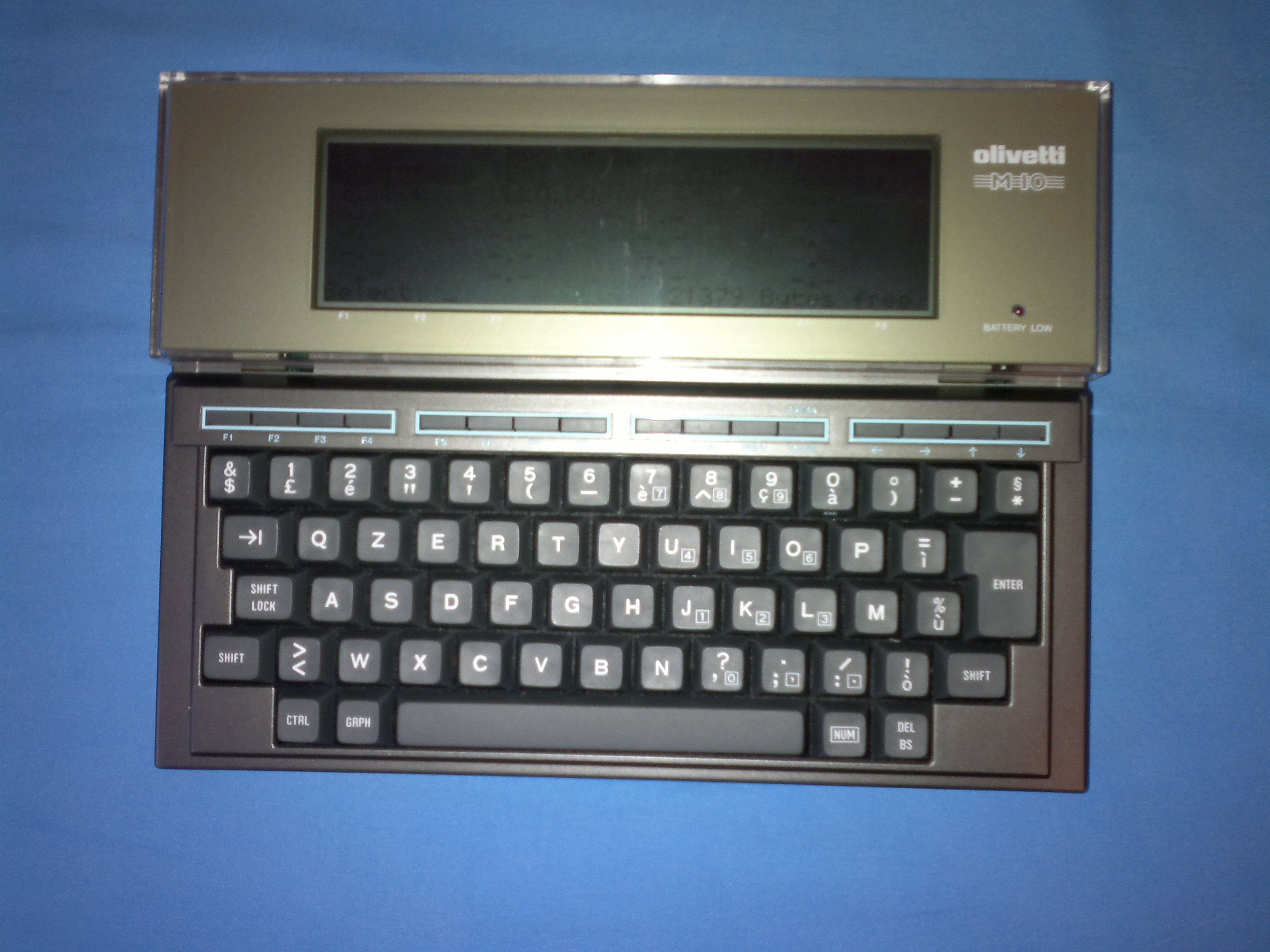
Olivetti M10: amarcord purchase

When I was 11 I had my first programming training.
At the time computers were still a fairly esoteric subject in Italy, but my school had the opportunity to get a few Olivetti M10 when they were introduced and offered the opportunity to the students, on a voluntary basis, to be trained to use the systems.

30 years later I’ve decided to buy a piece of my computing history and now it’s part of my collection of old hardware.

Welcome home M10

2013-02-05-020

Asus EA-66N: a great little AP

After living for quite some time with the wi-fi built into the ADSL modems (I have two lines at  home) I’ve decided that the signal needed some improvement to work reliably with the Nexus 7.
For this reason, after reading a lot of reviews online I’ve selected this small device: it’s not the cheapest device for the purpose but I trust Smallnetbuilder

The design is unconventional and the size was surprisingly small when I got it.
The installation manual is relatively fat but it’s only because it covers a dozen different languages: the actual content is quite skinny; this fortunately is not an issue as the setup, once connected to the web interface, is really easy to do.

Signal improved significantly on the Nexus 7: from 1-2 tabs with some occasional complete disconnection to 4 bars (out of 4) with few drops to 3 bars.
Also the Nokia Lumia 800 and E7 both have shown a significant improvement in signal quality.
The Acer 3810T was already working fine with the older solution: this is likely due to the larger radio antenna and greater available power.

The device can be used also as a wi-fi to ethernet bridge to connect a single device implementing in an easy way what I did using OpenWRT and to extend the wi-fi range, but I’ve not used it in this way.

Overall I had a very positive experience and would suggest this device to anyone having a need like mine.

Vodafone station issue

Today my home network had quite a few problems.
First Vodafone’s station decided that for my VOIP line was ok to abandon me in the middle of a conference call.
It turned out that it was not a temporary issue: the interface was reporting that everything was ok yet I was unable to place or receive other calls.

The hiccup of Vodafone’s device also got my dual wan router confused: even having a second WAN line working fine I was no longer able to access the internet.

I felt positive about the VF Station so I have reset everything else first: the PSTN+VOIP phone (Siemens Gigaset A580IP), the dual wan router (Netgear FVS336Gv2) and the network interface on the notebook

At the end pf the troubleshooting a physical power off of the station was needed to bring the service back.
Quite inconvenient as the device is located in a cabinet and not readily accessible and it’s not the fist time this happened to me.

Synology DS411Slim and encryption: major negative impact also in reading.

A few days ago I created an encrypted volume on my DS411Slim and reported a major degradation in writing speed.
I hoped that reading was maintained in the original ballpark, but this is not the case.
12.5MB/s is all I can get and is very bad in comparison with the former 70+ MB/s

Since my first post I did some research and, according to Synology’s own tests, I should get about twice the current speed.

I’ll give a try at a more recent version of DSM (I’m on the stock 3.2) to see if it provides better performance.
I’m usually a bit reluctant to update the firmware of working devices, but the opportunity of getting better performance on the 50GB backups is pushing me in this direction.

Synology DS411Slim and encryption: an unpleasant surprise

Some time ago I built an encrypted volume on my small nas from Synology and today I did the first real test.
I’m backing up an entire volume with Disk2VHD, a nice free utility from Microsoft’s Sysinternals tools to make online volume snapshots.
I did this in the past several times from the same machine on a regular non-encrypted volume on the same nas obtaining about 37 to 40 MB/s of sustained writing speed.

Given the hardware encryption engine included the nas I was expecting a similar performance with the encrypted volume but this is not the case.
The speed is down to 7MB/S, a sharp 80% loss.
I’m running DSM 3.2
I wonder if this is common/expected or not.
The backup will have to be again a nightly activity until I find a way to get back the high-speed when using the encryption 😦

Update: I’ve had the opportunity to test large reads too and it’s not looking good


Packard Bell iMedia I6657IT: you get what you pay for. And nothing more.

I helped a friend to pickup a new pc for his video editing hobby.
He was on a budget yet needed some muscle so we picked up this system (4-cores i5 and 8GB of RAM) even if we weren’t able to find online a review of the system.

After just a couple of days the box arrived from Amazon and we unboxed and installed the system last Friday.

On the plus side: the system has a nice HW specification for a good price, is compact, mechanically robust and extremely silent.

On the minus side: it ONLY has what is implied by the advertised HW.
We opened the system to add the HDD from the older PC and found out that there is no space to put it.
But this is a piece of the expansion problem: only the SATA headers for the included HDD and DVD are soldered on the motherboard.
The same cost-saving approach is used for the other interfaces that are common on DIY core i5 system.

There it is one PCIe 1x slot available that could be used to add SATA and or USB3 ports.
We should be able to go for an external high speed enclosure to expand the system in the future.